












CPQ catalog management
IQX’s CPQ catalog management feature provides a “home” for all your SKUs — products, services, parts, materials, labor, etc. — organized in sections and sub-sections that mirror your product tree.
Each entry in the catalog stores specs, pricing, linked documents (brochures and other product PDFs), and item-level rules that control how it appears on a quote.
IQX-managed setup
IQX handles the heavy lifting at setup and trains your admins so you launch with a customized catalog aligned to your products and pricing—ready for your team to keep current. We design the catalog, import items and prices, build bundles and relationships, and link product PDFs. You’ll enjoy:
- Faster, error-resistant quoting with complete product and service data
- Quicker item selection via attributes, relationships, and technical filters
- Consistent costing by auto-including required services where applicable
- A catalog structure your team can maintain without IT tickets
SKU attributes
Each SKU on your catalog includes fields for category, brand, supplier, custom fields, technical specs, pricing, and an image. These attributes make items easy to search, filter, and maintain—and ensure proposals include accurate, consistent information.
Bundles (kits with components)
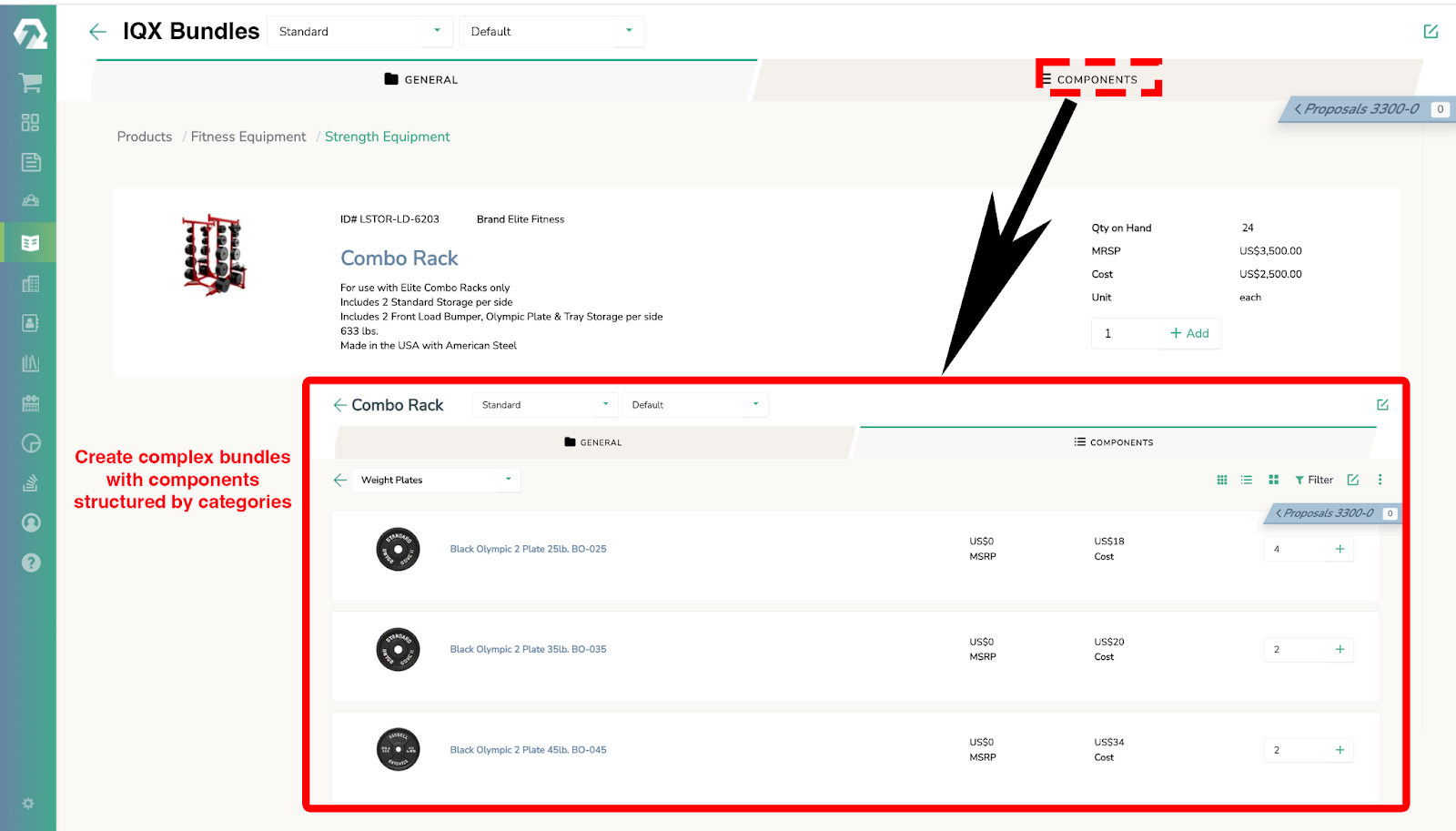
Create bundles/kits with component lines. Reps add one bundle; IQX adds the parent item and all components automatically. One click saves time—and required items aren’t forgotten.
Product relationships & brochures
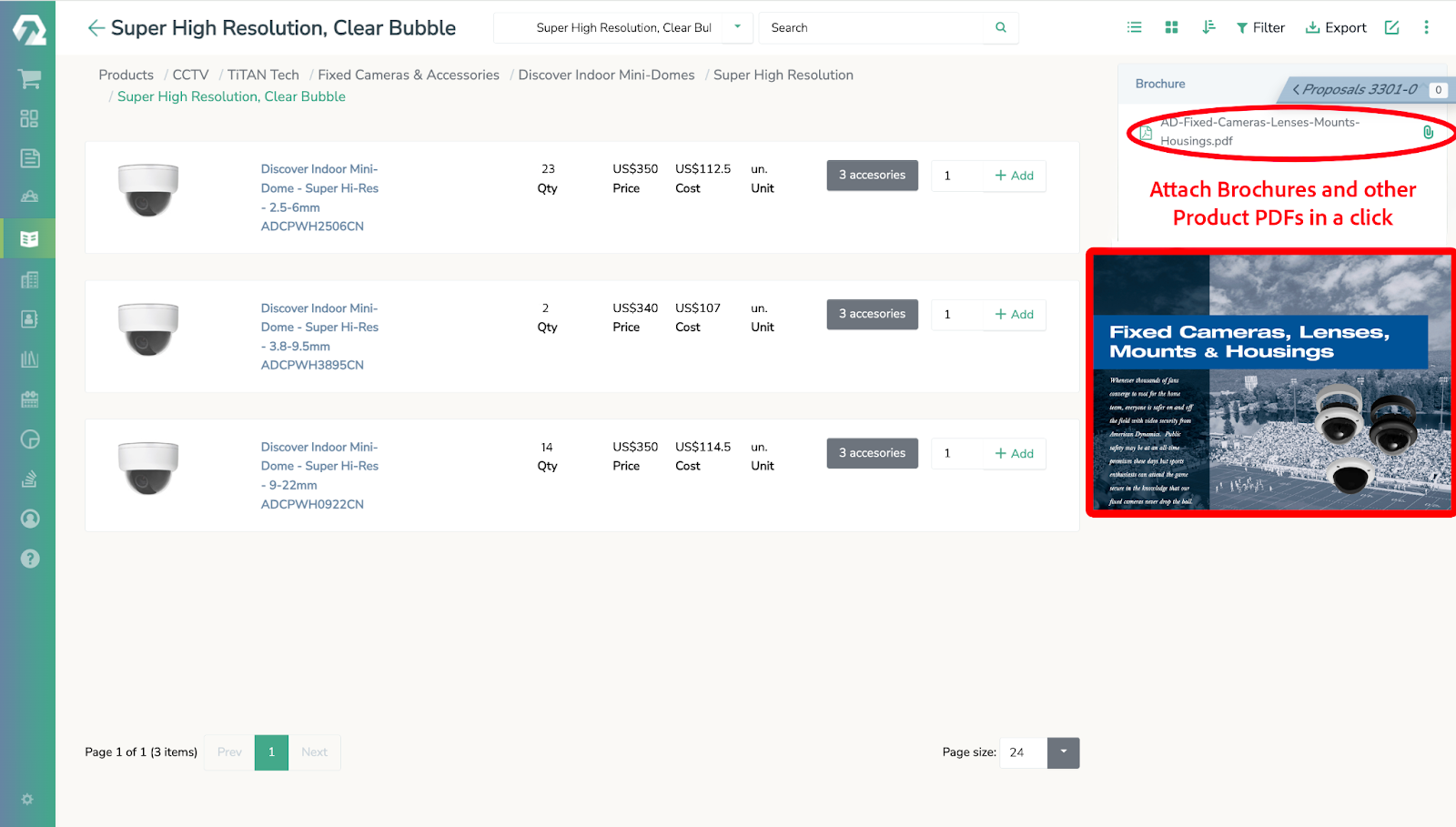
From any product page, reps can see related items—accessories, replacements, alternatives, and installation solutions—and attach brochures or other product PDFs to the quote in one click. This enables fast cross-sell and upsell with relevant add-ons and services.
Item search & technical filters
Search large catalogs by any part of the name or SKU. For technical selection, use user-defined filters (e.g., class, kVA, voltage, phase, size, finish) to surface only valid SKUs. Teams find the right options fast—without hunting through spec sheets.
Delivery variables (services & costs)
Items can include service parameters—installation/labor, delivery/transport, rental, and other service types—with a rate and time/units. When a product that requires services is selected, IQX can add the corresponding service cost with the item, so totals are complete without manual add-ons and costing stays consistent.
IQX Catalog features
IQX’s relational product tree helps ensure accurate and valid product bundles by defining component and cost dependencies (e.g., required, excluded, recommended). This eliminates configuration errors, streamlines the quoting process, and enables effective cross-selling/upselling. The image shows an example being used by a fitness equipment manufacturer.

Centralize and automate the creation, storage, and retrieval of essential sales documents (proposals, contracts, spec sheets), ensuring accuracy, consistency, and faster deal closure.
.jpg)
IQX’s product search engine–customized for each industry and even each client– quickly guides sales reps to the right products or bundles, minimizing search time and errors. This accelerates quote creation and ensures compatibility for complex orders.
.jpg)
Some of the reports IQX generates
This simple report considers all proposals including drafts. This is a good tool to see the level of activity that the sales representative is engaged in and gives a snapshot of effort.
.png)
This report calculates both Gross Revenue and Margin and translates it on a dateline with the percentage forecasted to close by the sales person. This should help Management assess the Net Revenue and Margins to expect in the future from past efforts.
.png)
This report gives a quick view as to the status of a proposal (whether it is closed or open) and does so within a selected time frame given by the sales manager.
.png)
This report provides detail by Agent, Quotes per period, Gross Revenue Open and Closed as well as Gross Revenue Quota, # of Quotes, $ / Closed Quote, and the Gross Revenue required to meet quota as well a Gross Revenue Difference required to meet quota.
.png)
This report provides detail by Agent, Quotes per period, Gross Revenue Open and Closed as well as Gross Revenue Quota, # of Quotes, $ / Closed Quote, and the Gross Revenue required to meet quota as well a Gross Revenue Difference required to meet quota.
.png)
Knowing what the expenses are as a percentage of Gross Margin can help management determine sales budget strategy and assess effective investment in the sales process by sales representative.
.png)

Contact us today for a free demo and see how our solution can help your business
The best way to learn about us is to see for yourself. We respect your privacy. No nonsense.

